nginx常用配置
## 安装
### 下载网址
> https://nginx.org/en/download.html
### windows安装
下载稳定的windows版本。
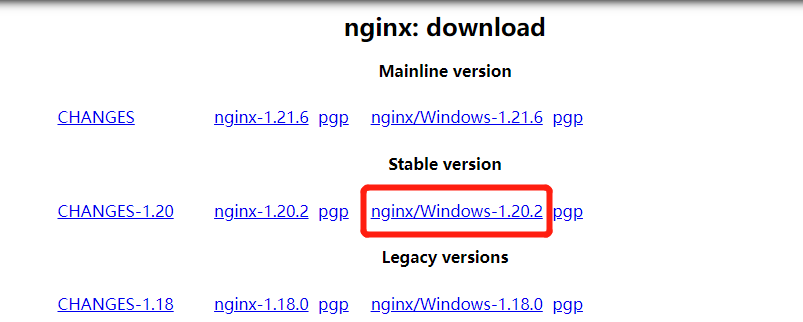
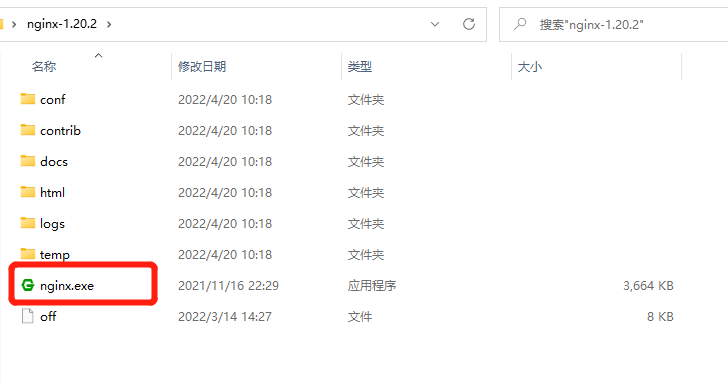
在你要安装的目录下直接解压,打开即可使用。
### linux安装
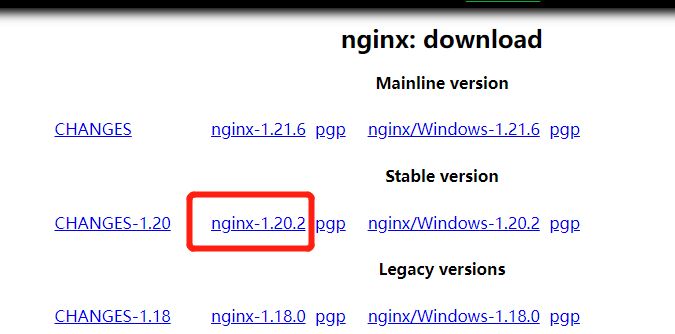
复制链接,在linux上需要安装的目录执行以下命令,下载并解压。
```sh
# 下载
wget https://nginx.org/download/nginx-1.20.2.tar.gz
# 解压
tar -zxvf nginx-1.20.2.tar.gz
# 进入解压好的目录
cd nginx-1.20.2/
```
安装nginx
```sh
# 安装ngixn需要的依赖
yum -y install gcc gcc-c++ zlib zlib-devel pcre-devel openssl openssl-devel
# 执行命令 配置安装路径 添加需要的模块
./configure --prefix=/home/nginx_config/nginx --error-log-path=/home/nginx_config/nginx/error-log --with-http_ssl_module --with-http_v2_module --with-http_realip_module --with-http_stub_status_module
# 编译安装
make && sudo make install
```
> ./configure 还有很多配置,有兴趣可自行了解
#### 启动命令
> 使用上面命令后的nginx安装目录:`/opt/nginx`,`./nginx` 在 `sbin` 目录下。
- 启动 `./nginx`
- 重启 `./nginx -s reload`
- 停止 `./nginx -s stop`
- 检查配置文件 `./nginx -t`
> 如果在其他电脑无法访问,记得修改防火墙打开对应的端口号。
```sh
# centos系统 端口控制
# 查询端口是否开放
firewall-cmd --query-port=80/tcp
# 永久添加80端口(全局)
firewall-cmd --add-port=80/tcp --permanent
# 永久删除80端口(全局)
firewall-cmd --remove-port=80/tcp --permanent
# 重启防火墙 执行后如果未生效则需要重启防火墙
systemctl restart firewalld
# 查看开放的端口列表
firewall-cmd --zone=public --list-ports
```
## 简单了解
### 配置文件结构
```nginx
# 全局配置参数
worker_processes 1;
error_log logs/error.log;
# 事件
events {
worker_connections 1024;
}
# http块 其中可包含多个server
http {
include mime.types;
default_type application/octet-stream;
# 虚拟主机 其中可包含多个location
server {
listen 80;
server_name localhost;
# 配置请求的路由
location / {
root html;
index index.html index.htm;
# location中可以嵌套location
location ~ .*\.(js|css)?$
{
expires 24h;
}
}
}
}
```
### 使用includ引入文件
在Nginx的配置文件中,include文件可以在任何地方,以便增强配置文件的可读性,并且能够使得部分配置文件重复使用。
使用include文件,要确保被包含的文件自身有正确的Nginx语法,然后指定这些文件的路径。
```nginx
# 直接指定文件路径
include /opt/local/etc/nginx/mime.conf;
# 使用通配符指定
include /opt/local/etc/nginx/vhost/*.conf;
# 如果没有给定全路径,那么Nginx将会依据它的主配置文件路径进行搜索。
include mime.conf;
```
修改配置文件后记得先测试一下在重启,命令为:`nginx -t -c `,可以指定测试的配置文件,也可不指定,直接使用`nginx -t`。
### server
任何由关键字server开始的部分都被称作“虚拟服务器”部分。它描述的是一组根据不同的server_name指令逻辑分割的资源,这些虚拟服务器响应HTTP请求,因此它们都包含在http部分中。一个虚拟服务器由listen和server_name指令组合定义。
#### listen
listen指令定义了一个IP地址/端口组合或者是UNIX域套接字路径。
```nginx
listen address[:port];
listen port;
listen unix:path;
```
#### server_name
server_name指令是相当简单的,但可以用来解决一些配置问题。它的默认值为"",这意味着server部分没有server_name指令,对于没有设置Host头字段的请求,它将会匹配该server处理。
除了普通的字符串之外,Nginx也接受通配符作为server_name指令的参数。
- 通配符可以替代部分子域名:*.test.com。
- 通配符可以替代部分顶级域:www.test.*。
- 一种特殊形式将匹配子域或域本身:.test.com(匹配*.test.com也包括test.com)。
- 通过在域名前面加上波浪号(~),server_name也可以使用正则表达式:~^www(\d+).test\\.(com)$;。
- server_name后面也可跟多个域名 `server_name a.test.com b.test.com`;
### location
location指令可以用在虚拟服务器server部分,并且意味着提供来自客户端的URI或者内部重定向访问。除少数情况外,location也可以被嵌套使用,它们被作为特定的配置尽可能地处理请求。
#### location语法
```nginx
location [=|~|~*|^~] /uri/ { … }
```
- = 使用精确匹配并且终止搜索。
- ^~ 如果该location是最佳的匹配,那么对于匹配这个location的字符串,
该修饰符不再进行正则表达式检测。注意,这不是一个正则表达式匹配,它的目的是优先于正则表达式的匹配。
- ~ 使用区分大小写的正则表达式匹配
- ~* 使用不区分大小写的正则表达式匹配
- 空 普通字符串匹配,例如 location /abc {}
以上顺序也是匹配时的优先级。
还有一种命名location
```nginx
location @name { … }
```
命名location仅对内部访问重定向,在进入一个location之前,它会保留被请求的URI部分。命名location只能够在server级别定义。
### 日志设置
Nginx日志主要分为两种:`access_log`(访问日志)和 `error_log`(错误日志)。通过访问日志我们可以得到用户的IP地址、浏览器的信息,请求的处理时间等信息。错误日志记录了访问出错的信息,可以帮助我们定位错误的原因。在`http`, `server`, `location`中都可配置。
> 注意:配置日志文件时,存放日志文件的文件夹必须存在,如果不存在需要手动创建,否则启动nginx会报错。
#### access_log(访问日志)
直接配置日志写入路径即可:
```nginx
access_log logs/test.com/test.itmtr.cn.log;
```
关闭日志:
```nginx
access_log off;
```
#### error_log(错误日志)
直接配置日志写入路径即可:
```nginx
error_log logs/test.com/error/test.itmtr.cn.log;
```
关闭日志:
```nginx
error_log /dev/null;
```
### 禁止访问
#### allow 允许访问
在`http`, `server`, `location`中都可配置。
格式: allow ip;
```nginx
allow 192.168.1.66;
# 允许所有ip访问
allow all;
```
#### deny 禁止访问
在`http`, `server`, `location`中都可配置。
格式: deny ip;
```nginx
deny 192.168.1.66;
# 要配置多个 在后面加多个即可 使用空格分割
deny 192.168.1.66 192.168.1.88;
# 禁止所有ip访问
deny all;
```
可以使用`allow 192.168.1.66;`加`deny all;`设置只允许指定ip访问。
注意:这个是按照顺序执行的,需要把`allow 192.168.1.66;`放在`deny all;`之前。
#### 配置账号密码
安装htpasswd
```sh
yum -y install httpd
```
生成密码文件
使用以下命令在文件夹`/home/nginx_config/config/file/`内创建名为`layui.htpasswd`的密码文件,用户名为`layui`密码为`123456`。
```sh
htpasswd -cb /home/nginx_config/config/file/layui.htpasswd layui 123456
```
配置以下代码,重启nginx即可。在http, server, location中都可配置。
```sh
# 这里是验证时的提示信息 不一定生效
auth_basic "请输入账号密码";
# 这里必须使用绝对路径 否则会报403
auth_basic_user_file /home/nginx_config/config/file/layui.htpasswd;
```
### 错误页面设置
在 `server` 模块增加一下配置即可。
```nginx
error_page 404 500 502 503 504 /error.html;
location = /error.html {
root html;
}
```
`error_page` 表示将那些错误码转发到指定的错误页面,`location` 使用 `=` 表示它的优先级是最高的。
当然,也可以分开配置,不同错误码不同的页面。
```nginx
error_page 404 /404.html;
error_page 502 /502.html;
```
可以设置页面返回的状态码。
```nginx
error_page 404 =200 /error.html;
```
还可以设置直接跳转指定页面。
```nginx
error_page 404 https://blog.itmtr.cn;
```
## 常用配置
### 静态资源网站
一般用于js、css和图片等静态资源的部署,可设置缓存,减少服务器压力。
```nginx
server {
listen 80;
server_name static.test.itmtr.cn;
# 或者通过location设置根目录
location / {
root ../html/static/;
index index.html index.htm default.htm default.html;
# 设置跨域 允许来自所有的访问地址
add_header 'Access-Control-Allow-Origin' '*.test.com';
# 是否允许后续请求携带认证信息(cookies),该值只能是true,否则不返回
add_header 'Access-Control-Allow-Credentials' 'true';
# 支持请求方式
add_header 'Access-Control-Allow-Methods' 'GET, PUT, POST, DELETE, OPTIONS';
add_header 'Access-Control-Allow-Headers' 'Content-Type,*';
# 可以通过设置不同的后缀的缓存时间
location ~ .*\.(js|css)?$
{
expires 24h;
# 取消日志打印
access_log off;
error_log /dev/null;
}
location ~ .*\.(gif|jpg|jpeg|png|bmp|swf)$
{
expires 30d;
}
}
access_log logs/static/access.log;
error_log logs/static/error.log;
}
```
### 文件访问
直接将系统中的一个文件夹分享出去,输入网址即可访问文件夹内所有文件,可以在内网中传输文件使用,不适用直接部署,比较危险。
```nginx
server {
listen 80;
server_name file.test.itmtr.cn;
# 或者通过location设置根目录
location / {
root ../html/file/;
# 设置index文件 一般没有index文件 直接访问列表
index index;
# 设置超时时间 避免文件过大超时
send_timeout 60;
# 开启目录浏览
autoindex on;
# 以html风格将目录展示在浏览器中
autoindex_format html;
# 切换为 off 后,以可读的方式显示文件大小,单位为 KB、MB 或者 GB
autoindex_exact_size off;
# 以服务器的文件时间作为显示的时间
autoindex_localtime on;
# 解决中文乱码问题 如果部署在windows系统上则不行
charset utf-8;
# 为layui目录添加密码
location /layui/ {
# 这里是验证时的提示信息 不一定生效
auth_basic "请输入账号密码";
# 这里必须使用绝对路径 否则会报403
auth_basic_user_file /home/nginx_config/config/file/layui.htpasswd;
}
}
access_log logs/file/access.log;
error_log logs/file/error.log;
}
```
### 反向代理
一般的java项目在服务器内使用其他端口直接启动,然后在nginx统一代理到80端口使用,方便统一管理,可单独设置错误页面,避免部署时无法访问等问题。
普通的反向代理
```nginx
server {
listen 80;
server_name web.test.itmtr.cn;
# 普通的反向代理
location / {
# 设置要代理的服务
proxy_pass http://localhost:8888/;
# 设置转发到上游服务器的请求头信息
proxy_set_header Host $host;
proxy_set_header X-Real-IP $remote_addr;
proxy_set_header X-Forwarded-For $proxy_add_x_forwarded_for;
proxy_set_header REMOTE-HOST $remote_addr;
# 根据上游服务器响应状态码的值进行拦截错误处理 与error_page 指令配合
proxy_intercept_errors on;
# 请求中body的大小 也是能传输文件的大小
client_max_body_size 20m;
# 表明了Nginx将会等待的时间长度
proxy_connect_timeout 60;
# Nginx同上游服务器连接成功的两次操作等待的时间
proxy_send_timeout 10;
proxy_read_timeout 10;
}
error_page 404 /404.html;
location = /404.html {
root ../html/error/;
}
error_page 500 502 /deploy.html;
location = /deploy.html {
root ../html/error/;
}
access_log logs/web/access.log;
error_log logs/web/error.log;
}
```
代理到指定的路径
```nginx
server {
listen 80;
server_name web.test.itmtr.cn;
# 普通的反向代理
location / {
# 设置要代理的服务
proxy_pass http://localhost:8888/admin/;
# 该指令替代从上游服务器来的Set-Cookie头中的domain属性;
# domain 被替换为一个字符串、一个正则表达式,或者是引用的变量
# proxy_cookie_domain
# 被替换为一个字符串、一个正则表达式,或者是引用的变量
proxy_cookie_path /admin /;
# 设置转发到上游服务器的请求头信息
proxy_set_header Host $host;
proxy_set_header X-Real-IP $remote_addr;
proxy_set_header X-Forwarded-For $proxy_add_x_forwarded_for;
proxy_set_header REMOTE-HOST $remote_addr;
# 根据上游服务器响应状态码的值进行拦截错误处理 与error_page 指令配合
proxy_intercept_errors on;
# 请求中body的大小 也是能传输文件的大小
client_max_body_size 20m;
# 表明了Nginx将会等待的时间长度
proxy_connect_timeout 60;
# Nginx同上游服务器连接成功的两次操作等待的时间
proxy_send_timeout 10;
proxy_read_timeout 10;
}
}
```
### 反向代理 包含webSocket
包含webSocket的反向代理
在普通的反向代理中加入以下配置即可:
```
# 时间设置太短并且为websocket没有通讯时会断开链接
proxy_read_timeout 86400;
proxy_set_header Upgrade $http_upgrade;
proxy_set_header Connection "upgrade";
```
完整配置
```nginx
server {
listen 80;
server_name ws.test.itmtr.cn;
location / {
# 设置要代理的服务
proxy_pass http://localhost:8888/;
# 设置转发到上游服务器的请求头信息
proxy_set_header Host $host;
proxy_set_header X-Real-IP $remote_addr;
proxy_set_header X-Forwarded-For $proxy_add_x_forwarded_for;
proxy_set_header REMOTE-HOST $remote_addr;
# 根据上游服务器响应状态码的值进行拦截错误处理 与error_page 指令配合
proxy_intercept_errors on;
# 请求中body的大小 也是能传输文件的大小
client_max_body_size 20m;
# 表明了Nginx将会等待的时间长度
proxy_connect_timeout 60;
# Nginx同上游服务器连接成功的两次操作等待的时间
proxy_send_timeout 10;
# 时间设置太短并且为websocket没有通讯时会断开链接
proxy_read_timeout 86400;
# websocket配置
proxy_set_header Upgrade $http_upgrade;
proxy_set_header Connection "upgrade";
}
access_log logs/ws/access.log;
error_log logs/ws/error.log;
}
```
### 部署前端单页面项目
Vue的当页面项目,打包好之后是一个一般是这样的结构。

页面的所有入口其实都是`index.html`,我们只要吧所有页面访问都转发到`index.html`上就可以了。
当然也可以对js,css等静态资源作相应的缓存。
这里主要用到的是`try_files`进行的转发。
完整配置
```nginx
server {
listen 80;
server_name vue.test.itmtr.cn;
root ../html/vue/;
index index.html;
location / {
index index.html;
# 按指定的file顺序查找存在的文件,并使用第一个找到的文件进行请求处理
# 查找路径是按照给定的root或alias为根路径来查找的
# 如果给出的file都没有匹配到,则重新请求最后一个参数给定的uri,就是新的location匹配
try_files $uri $uri/ /index.html;
}
# 设置缓存
location ~ .*\.(js|css)?$ {
expires 24h;
# 取消日志打印
access_log off;
error_log /dev/null;
}
location ~ .*\.(gif|jpg|jpeg|png|bmp|swf)$ {
expires 30d;
}
access_log logs/vue/access.log;
error_log logs/vue/error.log;
}
```
### https证书配置
首先我们需要申请一个证书,阿里云,腾讯云都有免费的,这里测试我使用`java`的`keytool`命令生成了一个,仅测试使用。
#### java生成ssl证书
```sh
keytool -genkey -v -alias ssl.test.itmtr.cn -keyalg RSA -keystore D:\itmtr\nginx_config\config\ssl\ssl.test.itmtr.cn.keystore -validity 3650
```
您的名字与姓氏 为你要生成证书的域名。
`D:\itmtr\nginx_config\config\ssl\ssl.test.itmtr.cn.keystore`为证书生成的路径。
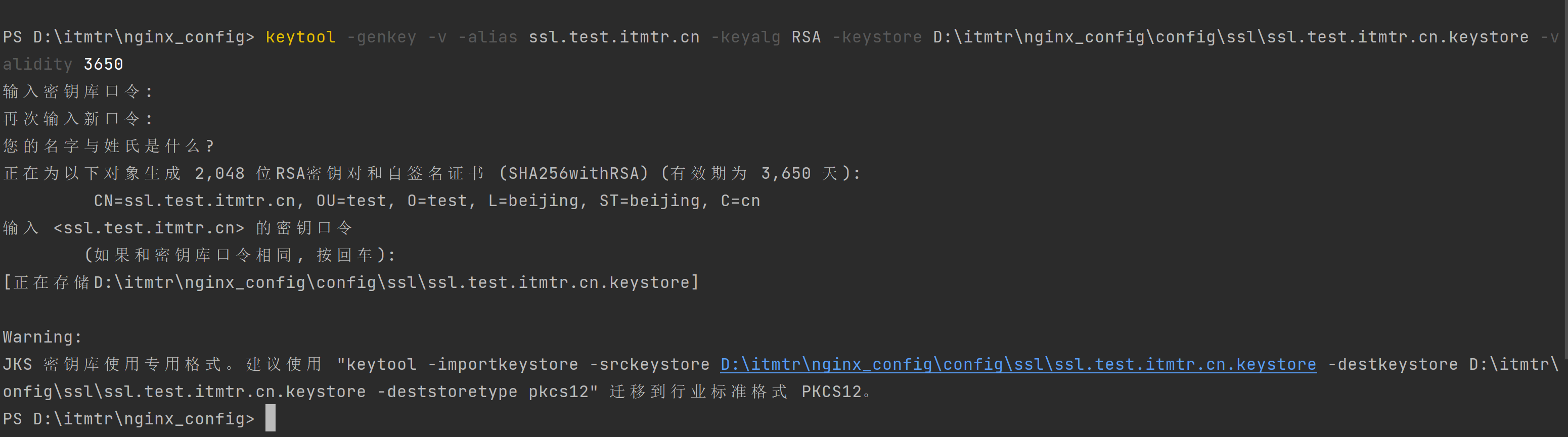
生成好文件`ssl.test.itmtr.cn.keystore`后,使用`JKS2PFX.bat`命令转换为nginx可以用的证书格式。
```sh
JKS2PFX.bat D:\itmtr\nginx_config\config\ssl\ssl.test.itmtr.cn.keystore 123456 ssl.test.itmtr.cn D:\itmtr\nginx_config\config\ssl\ssl.test.itmtr.cn
```
命令解析,`\JKS2PFX.bat`文件在仓库中有。
- .\JKS2PFX.bat
- KeyStore文件绝对路径
- KeyStore文件对应的密码
- 生成证书CSR时所起的Alias别名 ()
- 准备导出的文件名称(不要带扩展名)
- 生成文件路径
执行完成后会生成`ssl.test.itmtr.cn.crt`,`ssl.test.itmtr.cn.key`,`ssl.test.itmtr.cn.pfx`三个文件,在nginx中配置即可。
完整配置
```nginx
server {
listen 80;
listen [::]:80;
listen 443 ssl http2;
server_name ssl.test.itmtr.cn;
root ../html/static/;
index index.php index.html index.htm default.php default.htm default.html;
# 强制跳转https
if ($server_port !~ 443){
rewrite ^(/.*)$ https://$host$1 permanent;
}
# ssl配置
ssl_certificate ../../config/ssl/ssl.test.itmtr.cn.crt;
ssl_certificate_key ../../config/ssl/ssl.test.itmtr.cn.key;
ssl_protocols TLSv1.1 TLSv1.2;
ssl_ciphers ECDHE-RSA-AES128-GCM-SHA256:ECDHE:ECDH:AES:HIGH:!NULL:!aNULL:!MD5:!ADH:!RC4;
ssl_prefer_server_ciphers on;
ssl_session_cache shared:SSL:10m;
ssl_session_timeout 10m;
error_page 497 https://$host$request_uri;
}
```
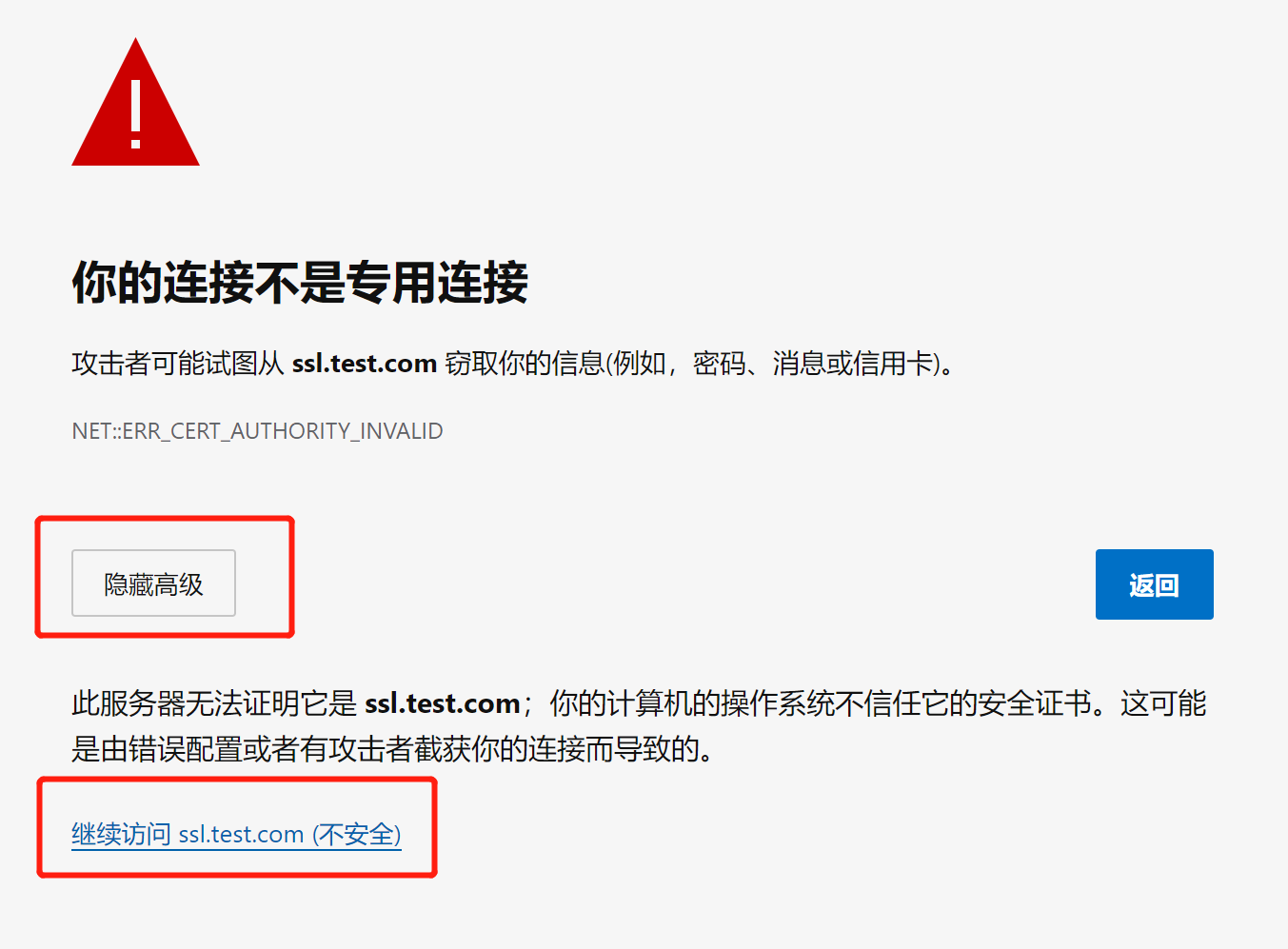
因为是自己生成的,所以浏览器不认,需要从这里进入。
## if
### nginx中取值
nginx的配置文件中可以使用的内置变量以美元符$开始,也有人叫全局变量。
#### 内置变量
> 以下为常用变量,更多可去官网查看:http://nginx.org/en/docs/varindex.html。
$remote_addr:客户端地址,通常是ip
$remote_port:客户端端口,一般是随机端口
$remote_user:客户端用于认证的用户名,没有则显示“-”
$local_time:服务器本地时间
$server_addr:接受客户端请求的服务器ip地址
$server_port:接受客户端请求的服务器的端口
$server_name:接受客户端请求的服务器名称,通常是域名(如果有)
$host:取值按照以下顺序:①请求行中的host name;②请求头中的“Host”字段;③处理请求的server name
$scheme:使用http还是https
$request_method:请求方式,Get、POST等
$request_uri:完整的原始请求URI,包括请求的参数(如有)
$server_protocol:请求协议,“HTTP/1.0”, “HTTP/1.1”, or “HTTP/2.0”
$status:响应码,200,302等等
$body_bytes_sent:发送到客户端的字节数,不包括响应头
$request_time:请求处理的时间(以秒和毫秒为单位),也就是从客户端读取第一个字节开始所经过的时间
$request_header:请求的长度,包括请求行,请求头,请求体
$http_user_agent:客户端代理,如果使用的浏览器访问,显示的是浏览器的类型版本等信息
$http_cookie:请求所携带的cookie
#### 获取请求头数据
格式:`$http_{请求头小写 -变为_}`;
例子:获取请求头中自定义的`My-token`字段,`$http_my_token`;
### nginx中赋值
```
格式:set ${变量名} {值};
例如:set $flag 0;
```
### if语法
```nginx
if (表达式) {
...
}
```
#### 表达式语法
1、正则表达式匹配:
- `==` 等值比较;
- `~` 与指定正则表达式模式匹配时返回“真”,判断匹配与否时区分字符大小写;
- `~*` 与指定正则表达式模式匹配时返回“真”,判断匹配与否时不区分字符大小写;
- `!~` 与指定正则表达式模式不匹配时返回“真”,判断匹配与否时区分字符大小写;
- `!~*` 与指定正则表达式模式不匹配时返回“真”,判断匹配与否时不区分字符大小写;
2、文件及目录匹配判断:
- `-f, !-f` 判断指定的路径是否为存在且为文件;
- `-d, !-d` 判断指定的路径是否为存在且为目录;
- `-e, !-e` 判断指定的路径是否存在,文件或目录均可;
- `-x, !-x` 判断指定路径的文件是否存在且可执行;
#### 例子
如果`referer`不是指定域名,则返回403
```nginx
if ($http_referer !~ '.*itmtr\.cn.*') {
return 403;
}
```
如果文件不存在则返回400
```nginx
if (!-f $request_filename) {
return 400;
}
```
因为nginx的配置中不支持if条件的逻辑与&& 逻辑或|| 运算等逻辑运算符 ,而且不支持if的嵌套语法,否则会报错。我们可以用下面的方法来实现。
```nginx
set $flag 0;
if ($host != 'www.itmtr.cn'){
set $flag "${flag}1";
}
if ($host != 'blog.itmtr.cn'){
set $flag "${flag}1";
}
if ($flag = "011"){
return 403;
}
```
## 下载代码
[https://gitee.com/itmtr/nginx_config](https://gitee.com/itmtr/nginx_config)